➜ ~ cat writing/azure-networking-costs.md
Azure Networking Costs — and the traps nobody warns you about
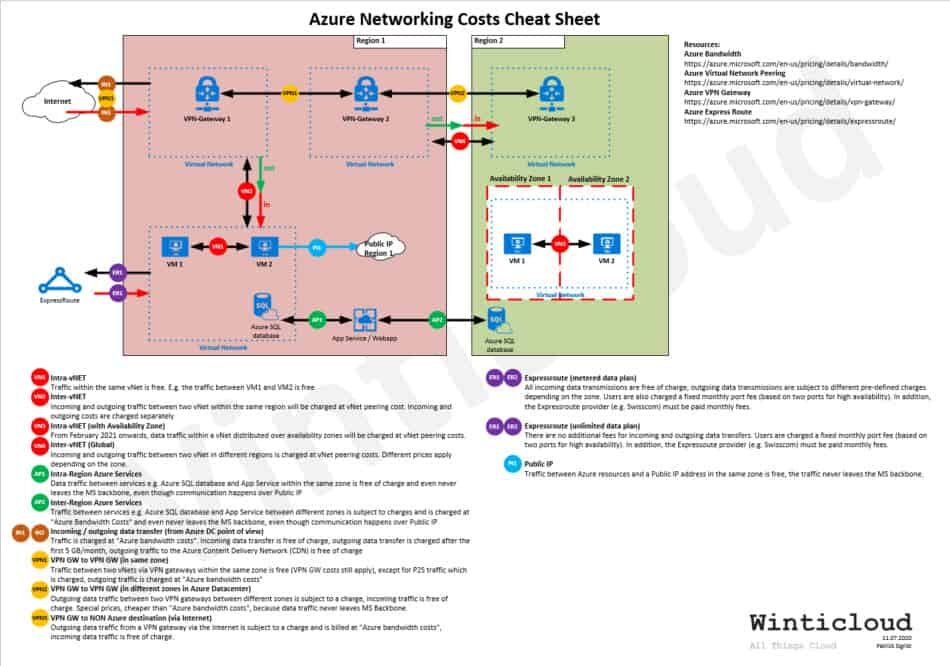
Have you ever wondered what network costs are incurred in Azure? Whenever colleagues ask me what this or that costs in Azure, I usually say: “Nothing is for free in Azure.” Contrary to my not-very-serious statement, there really are constellations which do not cause any costs. With this article on Azure Networking Costs — and the free Azure Networking Costs Cheat Sheet (PDF) — I want to contribute a little light to this topic of networking costs.
Armed with this knowledge of Azure networking costs, you should be able to make design decisions based on the costs that can be incurred.
INTER vs. INTRA communication
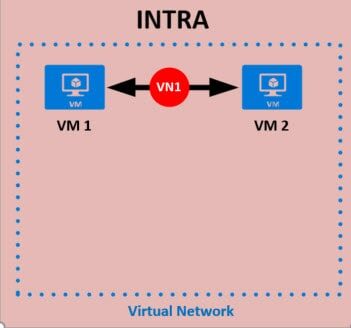
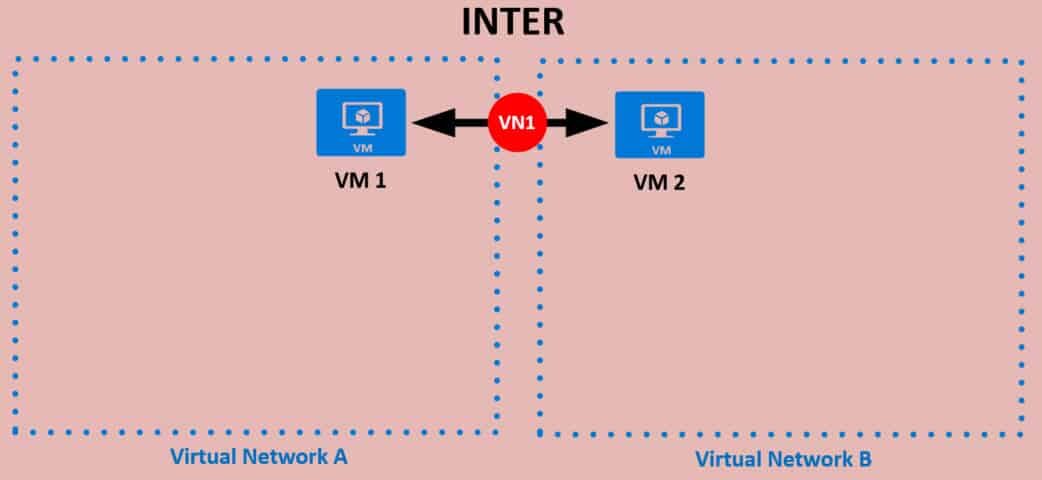
Since there always seems to be confusion with the expressions INTRA and INTER, here is how I understand them, using the example of vNet communication.
An INTRA virtual network communication means that the communication between two virtual machines (VM1 and VM2) happens within the same virtual network, as shown in the example below.
An INTER virtual network communication means that the communication happens between two virtual machines (VM1 and VM2) between two different virtual networks (Virtual Network A and Virtual Network B).
Azure zones for billing purposes
A zone is a geographical grouping of Azure regions for billing purposes. Data transfer pricing is based on the zones. A sub-region is the lowest-level geo-location that you may select to deploy your applications and associated data. For data transfers (except CDN), the following regions correspond to Zone 1, Zone 2, Zone 3, and DE Zone 1.
- Zone 1 — Australia Central, Australia Central 2, Canada Central, Canada East, North Europe, West Europe, France Central, France South, Germany North (Public), Germany West Central (Public), Norway East, Norway West, Switzerland North, Switzerland West, UK South, UK West, Central US, East US, East US 2, North Central US, South Central US, West US, West US 2, West Central US
- Zone 2 — East Asia, Southeast Asia, Australia East, Australia Southeast, Central India, South India, West India, Japan East, Japan West, Korea Central, Korea South
- Zone 3 — Brazil South, South Africa North, South Africa West, UAE Central, UAE North
- DE Zone 1 — Germany Central (Sovereign), Germany Northeast (Sovereign)
Note — A zone is a geographical grouping of Azure regions for billing purposes. Data transfer pricing is based on the zones.
Costs incurred by Virtual Networks (vNet)
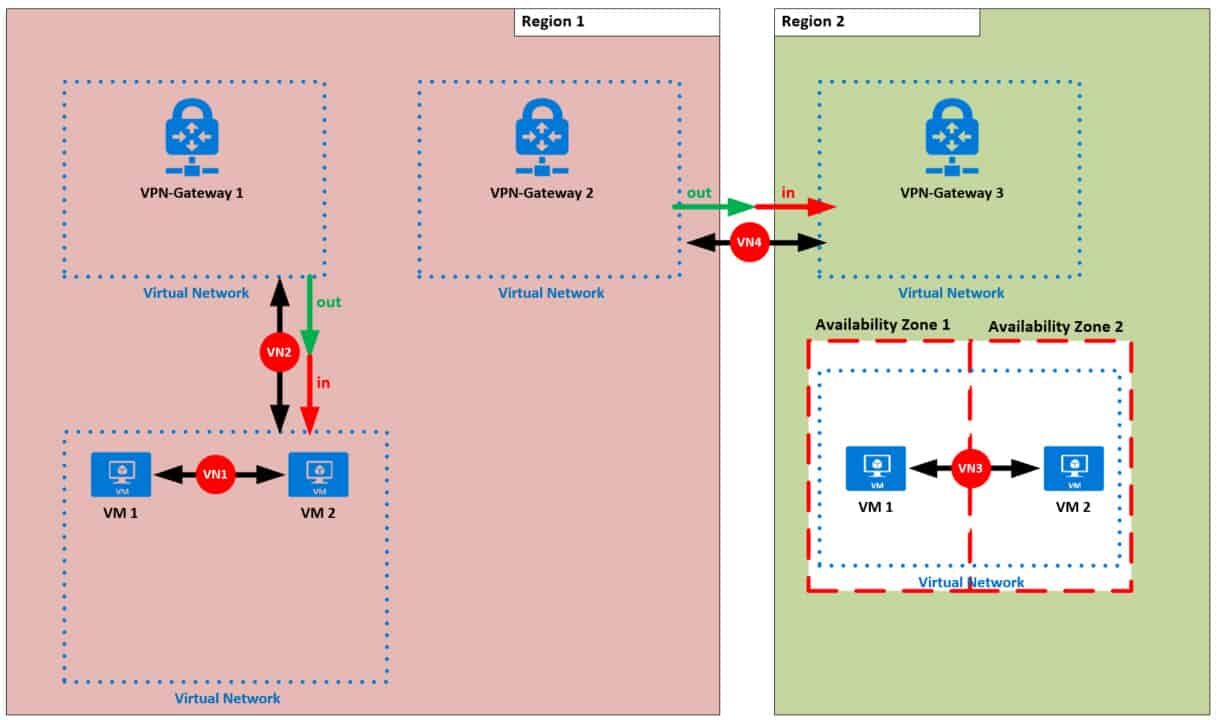
The following section explains the costs that arise when a virtual network is implemented in Azure. By the way, a vNet is the basis for almost everything you want to build in Azure. So here is the good news: an Azure Virtual Network is free of charge. The red circles with the white numbers on the drawing show the different cases. The number, e.g. (VN1), is then used again in the titles to describe the case.
(VN1) Intra-vNet
Traffic within the same vNet is free. E.g. the traffic between VM1 and VM2 is free.
(VN2) Inter-vNet (via vNet peering)
Virtual network peering links virtual networks, enabling you to route traffic between them using private IP addresses. Ingress and egress traffic is charged at both ends of the peered networks at vNet peering cost. Incoming and outgoing costs are calculated separately, therefore they have been differentiated with red and green.
(VN3) Intra-vNet (with availability zone)
Traffic between two VMs in an availability zone is free. That is, data going into a VM deployed in an availability zone and data going out of a VM deployed in an availability zone is free of charge. Data-transfer billing between virtual machines across availability zones will begin on 1 February 2021.
Note — An availability zone is an isolated location inside an Azure region, and has its own independent power source, network and cooling. The physical and logical separation of availability zones within an Azure region protects apps and data from zone-level failures. Availability-zone data-transfer pricing is based on availability zones.
(VN4) Inter-vNet (via global vNet peering)
Incoming and outgoing traffic between two vNets in different zones is charged at global vNet peering cost. Global vNet peering pricing is based on a zonal structure. For instance, if data is being transferred from a vNet in Zone 1 to a vNet in Zone 2, customers will incur outbound data-transfer rates for Zone 1 and inbound data-transfer rates for Zone 2.
Good news! An Azure Virtual Network is free of charge, and so is traffic that flows within the same vNet. Every subscription is allowed to create up to 50 virtual networks across all regions.
Costs incurred by Azure services
The following section explains the costs that arise when Azure services are being addressed in Azure. The green circles with the white numbers on the drawing show the different cases. The number, e.g. (AP1), is then used again in the titles to describe the case.
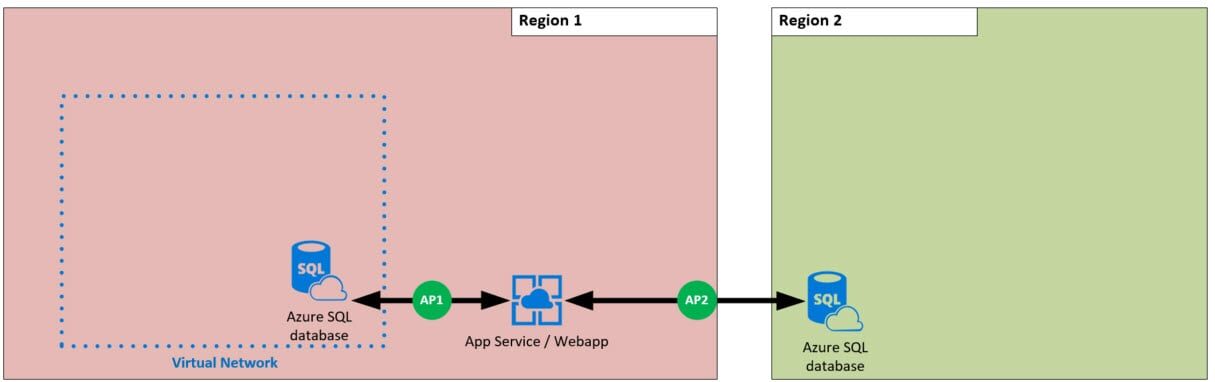
(AP1) Intra-zone Azure services
Data traffic between services — e.g. an Azure SQL database and an App Service — within the same region is free of charge and never even leaves the Microsoft backbone, even though communication happens over a public IP.
(AP2) Inter-zone Azure services
Traffic between services — e.g. an Azure SQL database and an App Service — between different zones is charged at Azure bandwidth cost. Outbound data transfer is charged at the normal rate and inbound data transfer is free. The traffic never leaves the Microsoft backbone, even though communication happens over a public IP.
Good news! Intra-zone Azure services data traffic is free of charge.
Costs incurred by transfers to and from the internet
The following section explains the costs that arise when data is transferred either from the Azure data center or to the Azure data center. The brown circles with the white numbers on the drawing show the different cases. The number, e.g. (IN1), is then used again in the titles to describe the case.
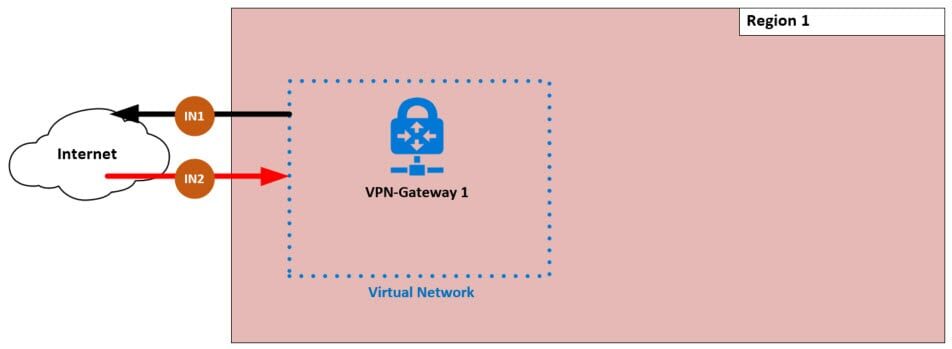
(IN1) Incoming data transfer (from the Azure DC point of view)
Incoming data transfer is free of charge.
(IN2) Outgoing data transfer (from the Azure DC point of view)
Traffic is charged at Azure bandwidth cost. Outgoing data transfer is charged after the first 5 GB/month; outgoing traffic to the Azure Content Delivery Network (CDN) is free of charge.
Good news! Incoming data transfer from the internet to the Azure data center is free of charge, and so is the traffic destined for the Azure CDN.
Costs incurred by VPN gateways
The following section explains the costs that arise when data is transferred via a VPN gateway, either from the Azure data center or to it. The yellow circles with the black numbers on the drawing show the different cases. The number, e.g. (VPN1), is then used again in the titles to describe the case.
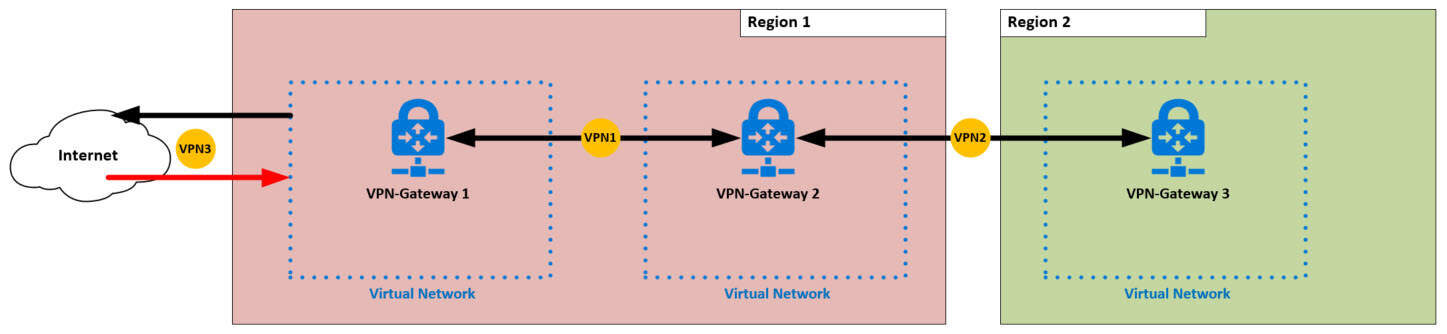
(VPN1) VPN GW to VPN GW (same zone, both GW in the Azure data center)
Traffic between two vNets via VPN gateways within the same zone is free of charge (VPN GW costs still apply), except for P2S outgoing traffic, which is charged at Azure bandwidth cost, as this traffic leaves the Azure data center.
(VPN2) VPN GW to VPN GW (different zones, both GW in the Azure data center)
Outgoing data traffic between two VPN gateways in different zones is subject to a charge; incoming traffic is free of charge. Special prices apply — cheaper than Azure bandwidth cost — because the data traffic never leaves the Microsoft backbone.
(VPN3) VPN GW to a non-Azure destination (via the internet)
Outgoing data traffic from a VPN gateway via the internet is subject to a charge and is billed at Azure bandwidth cost; incoming data traffic is free of charge.
Good news! Traffic between two vNets via VPN gateways within the same zone is free of charge.
Costs incurred by ExpressRoute
The following section explains the costs that arise when ExpressRoutes are being used. The purple circles with the white numbers on the drawing show the different cases. The number, e.g. (ER1), is then used again in the titles to describe the case.
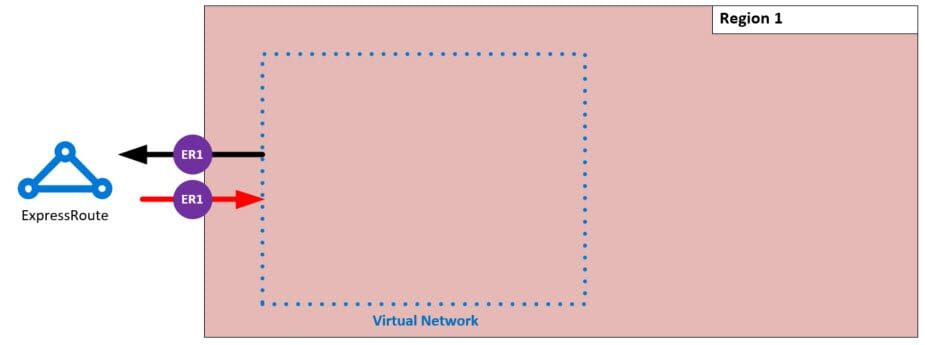
(ER1)(ER2) ExpressRoute — metered data plan
All incoming data transmissions are free of charge; outgoing data transmissions are subject to different pre-defined charges depending on the zone. Users are also charged a fixed monthly port fee (based on two ports for high availability). In addition, the ExpressRoute provider (e.g. Swisscom) must be paid monthly fees.
(ER1)(ER2) ExpressRoute — unlimited data plan
There are no additional fees for incoming and outgoing data transfers. Users are charged a fixed monthly port fee (based on two ports for high availability). In addition, the ExpressRoute provider (e.g. Swisscom) must be paid monthly fees.
Costs incurred by public IPs
The following section explains the costs that arise when public IPs are being used. The blue circles with the white numbers on the drawing show the different cases. The number, e.g. (PI1), is then used again in the titles to describe the case.
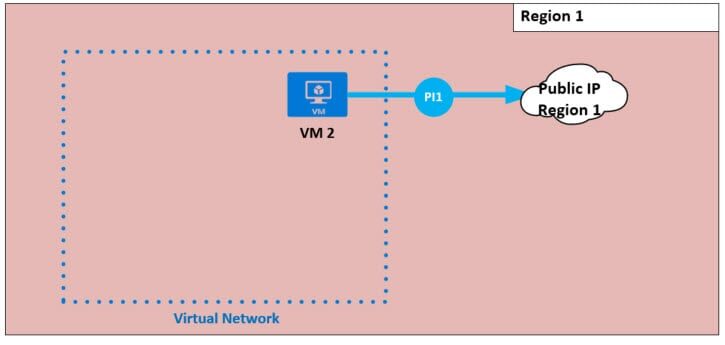
(PI1) Public IP
Traffic between Azure resources and a public IP address in the same zone is free — the traffic never leaves the Microsoft backbone. However, costs for the public IP itself are charged.
Download the cheat sheet
Everything explained above, summarised on a single cheat sheet. No strings attached — just show some appreciation for the hard work.
- ↓ English — Azure Networking Costs Cheat Sheet (PDF)
- ↓ Deutsch — Azure Networking Costs Cheat Sheet (PDF)
Sources
The following sources were used to prepare this article:
- Azure Bandwidth — https://azure.microsoft.com/en-us/pricing/details/bandwidth/
- Azure Virtual Network Peering — https://azure.microsoft.com/en-us/pricing/details/virtual-network/
- Azure VPN Gateway — https://azure.microsoft.com/en-us/pricing/details/vpn-gateway/
- Azure ExpressRoute — https://azure.microsoft.com/en-us/pricing/details/expressroute/